Keyboard
GDevelop gives access to all inputs made on the keyboard. This includes conditions to check if a key was pressed or released.
Warning
Keyboard conditions do not work with the on-screen keyboard on touch devices. For mobile or touchscreen games, rely on the mouse/touch conditions instead.
Any key pressed / Any key released
These conditions are true when any key on the keyboard is pressed (held) or has just been released. They are convenient for "Press any key to start" prompts.
Key pressed vs Key just pressed
GDevelop offers two distinct conditions to detect a key press:
- Key pressed stays true as long as the key is held down. Use it for continuous actions like moving a character while an arrow key is held.
- Key just pressed is true only on the single frame when the key was first pressed. Use it for one-shot actions like opening a menu, jumping, or shooting — even if the player keeps the key held, the action will only trigger once.
Key released
Whenever the key selected while setting this condition is released, the corresponding actions are performed.
Key pressed / released / just pressed (text expression)
To test a key event using a text expression, you need to enter the key name in the form of a text expression. For example, to check for the left arrow key, you would enter "Left" in the field.
Danger
Make sure that the key name is surrounded by quotes.
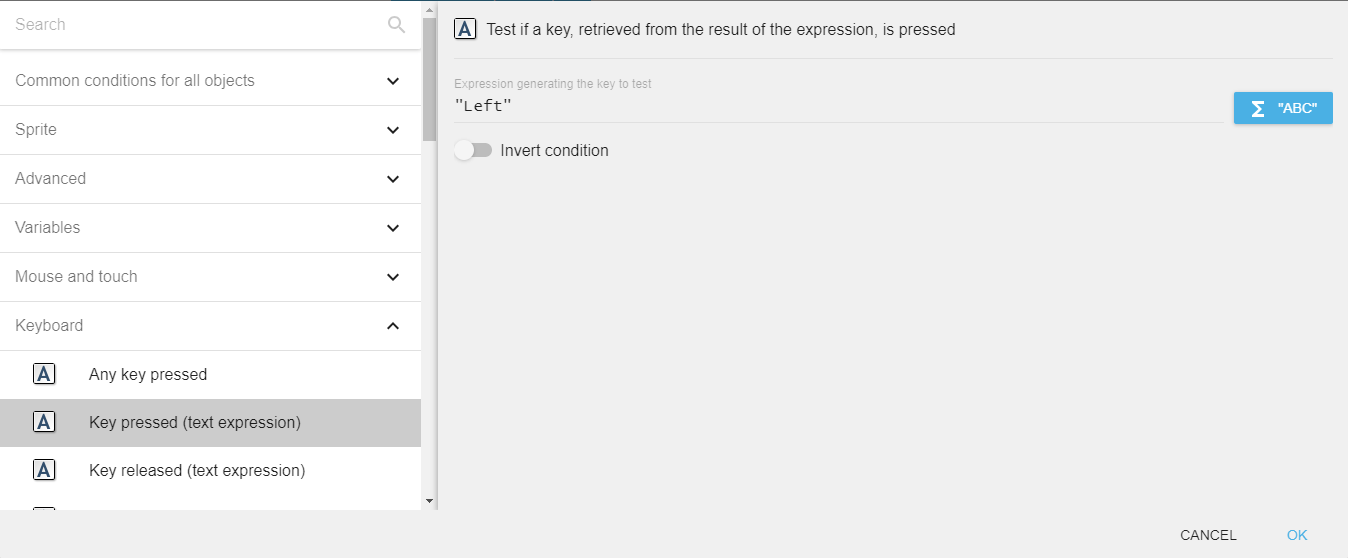
This is useful when the key to check is dynamic — for example, when reading the key to use from a player setting stored in a variable, or when implementing remappable controls.
Key names
The key name used in expressions matches the value returned by Last pressed key. Common key names include:
- Letter keys:
"a"to"z"(lowercase) - Number row:
"Num0"to"Num9" - Numpad:
"Numpad0"to"Numpad9","NumpadAdd","NumpadSubtract","NumpadMultiply","NumpadDivide","NumpadReturn" - Arrows:
"Left","Right","Up","Down" - Modifiers:
"LShift","RShift","LControl","RControl","LAlt","RAlt","LSystem","RSystem"(Windows/Cmd key) - Function keys:
"F1"to"F12" - Other:
"Space","Return"(Enter),"Tab","Escape","Back"(Backspace),"Delete","Insert","Home","End","PageUp","PageDown" - Punctuation:
"SemiColon","Comma","Period","Quote","Slash","BackSlash","Equal","Dash","LBracket","RBracket","Tilde"
Left and right modifier keys (Shift, Control, Alt) are distinct: a condition checking "LShift" is not triggered when the right Shift key is pressed.
Last key pressed
The Last pressed key expression returns the last key press as a string (for example, "Left" for the left arrow). This is convenient for control remapping: when waiting for the player to press a key to bind, read this expression after the Any key pressed condition becomes true and store the result in a variable.
Reference
All actions, conditions and expressions are listed in the keyboard reference page.